Product strategy, workflow design, prompt architecture, interface direction, and operational logic.
Case Study / Human-Centered AI System
ClearPath OS Lite
A calm AI-powered clarity system for reducing cognitive load: capture the mess, let AI structure it, review what matters, and move forward with a lighter mind.
ProblemMental noise and scattered life admin
SystemCapture, AI structure, human review, daily plan
ProofProduct screens, flow diagram, before / after state, dashboard
OutcomeLower cognitive load, clearer next steps, calmer action
Signature Visual
From mental noise to calm action.
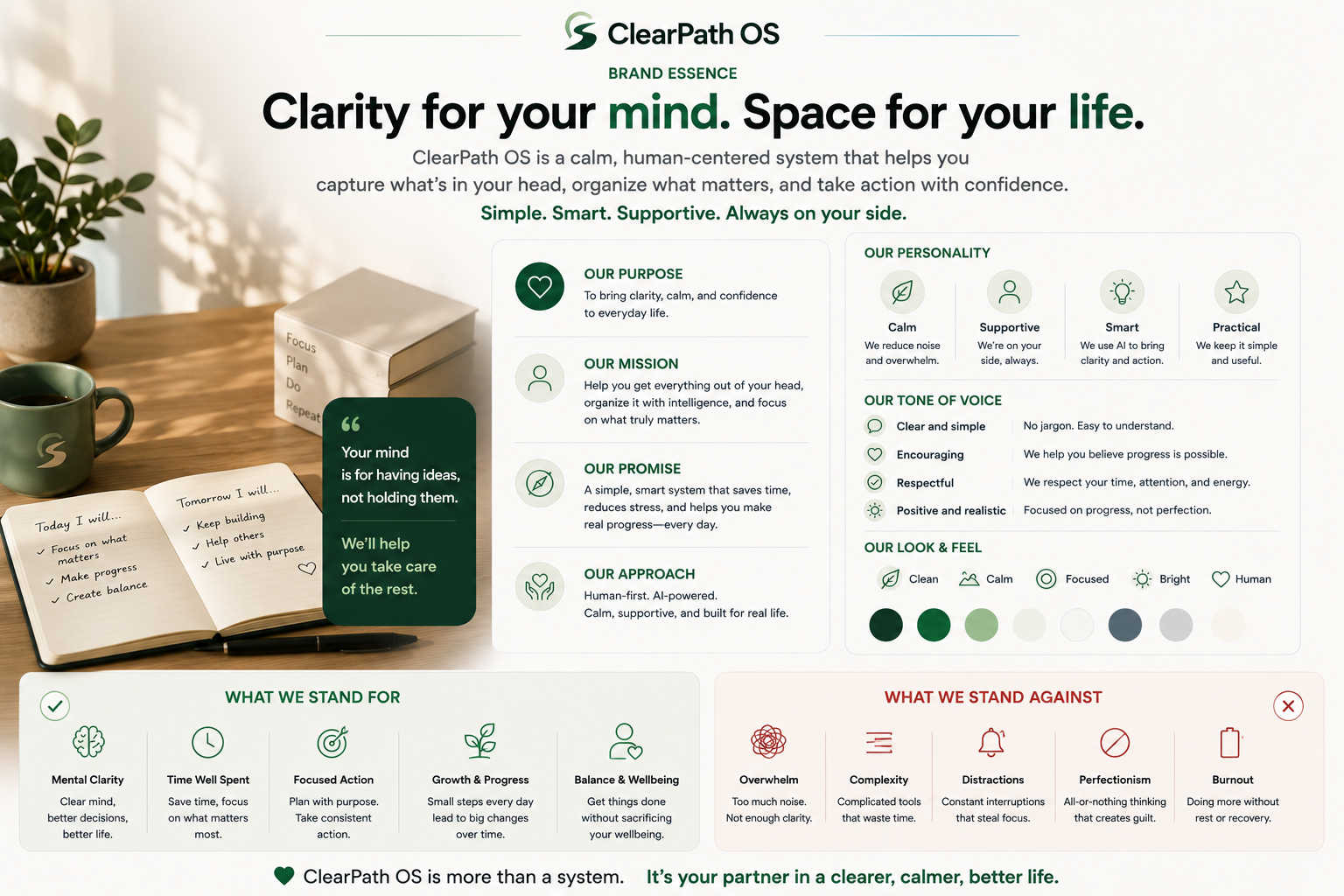
ClearPath OS Lite is not about doing more. It is about lowering the mental cost of knowing what to do next.
Before
Mental noise
AI
Structure without taking over.
After
Calm action
TodayOne admin loop + one work move.
NextCall insurance. Update headline.
HoldSave AI idea as a project.
AvoidOpening five new threads.
Visual Evidence
See the system before reading the strategy.
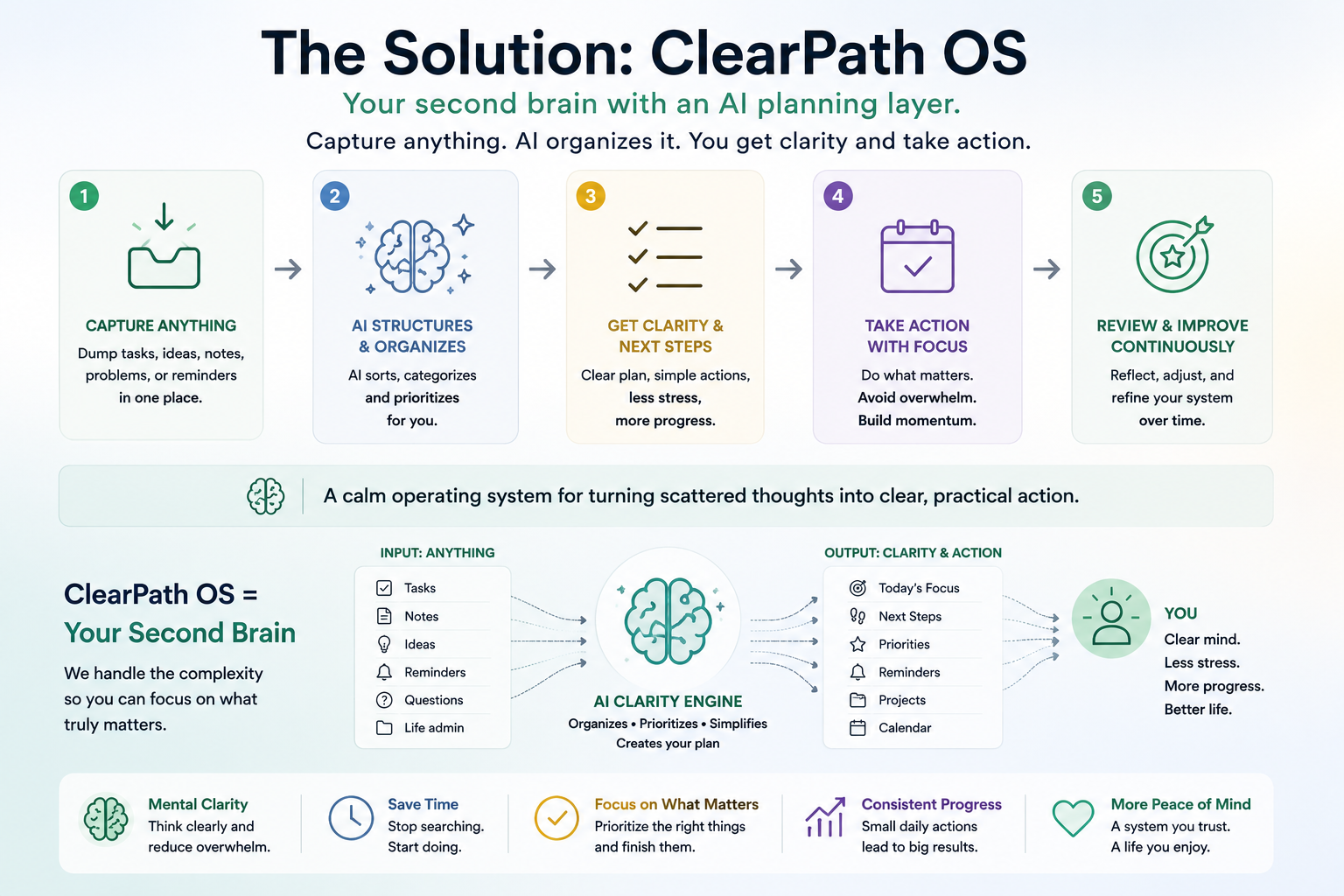
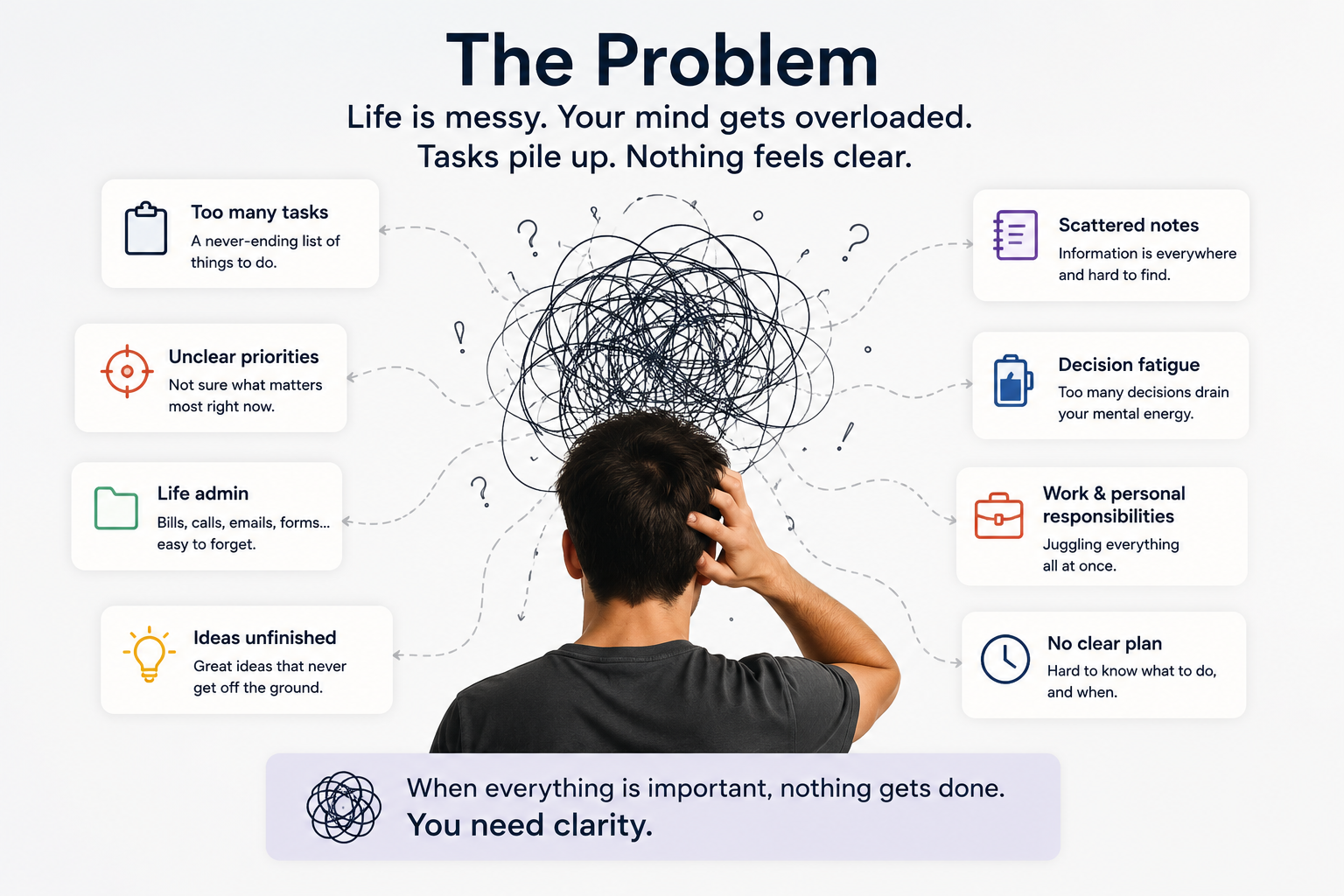
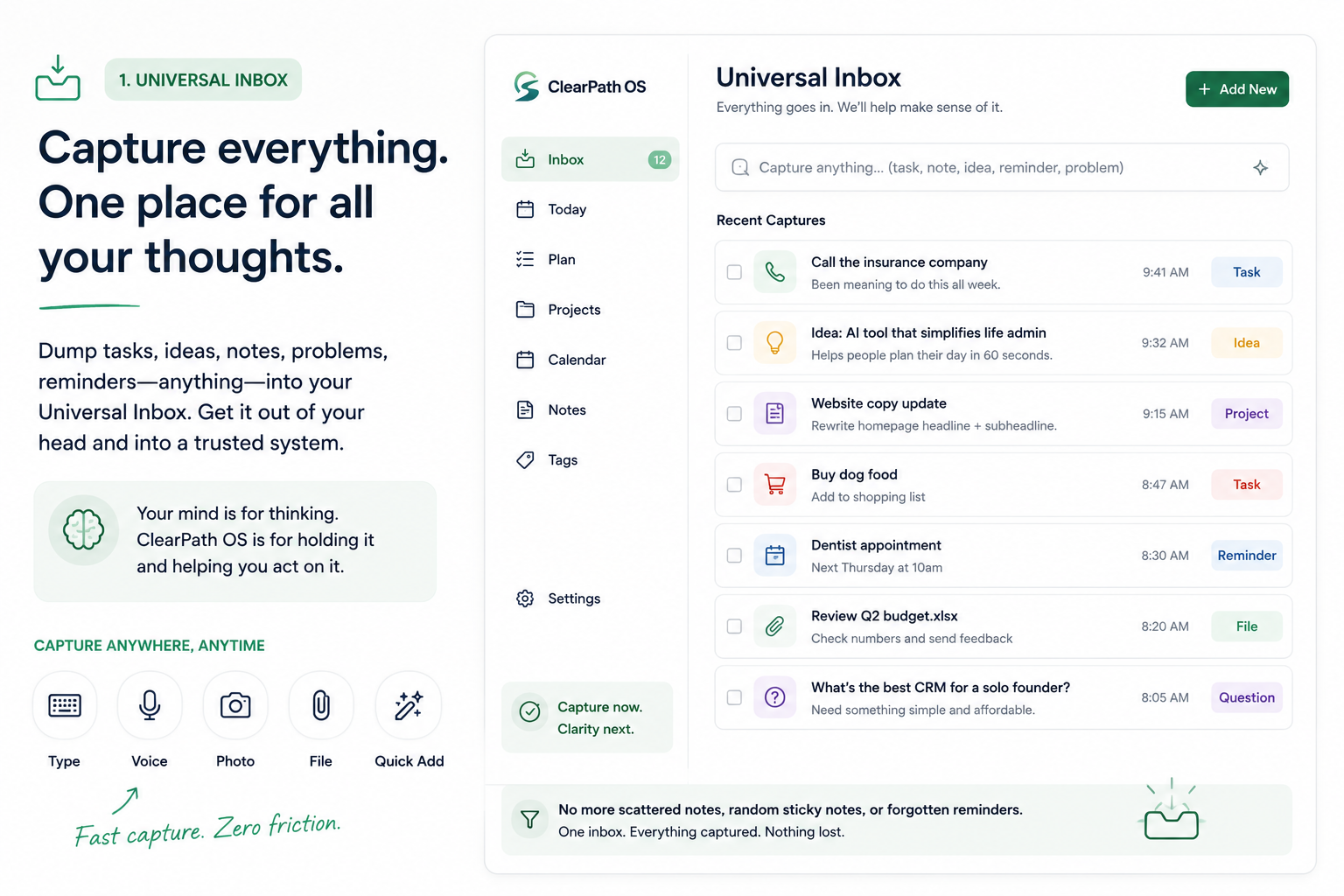
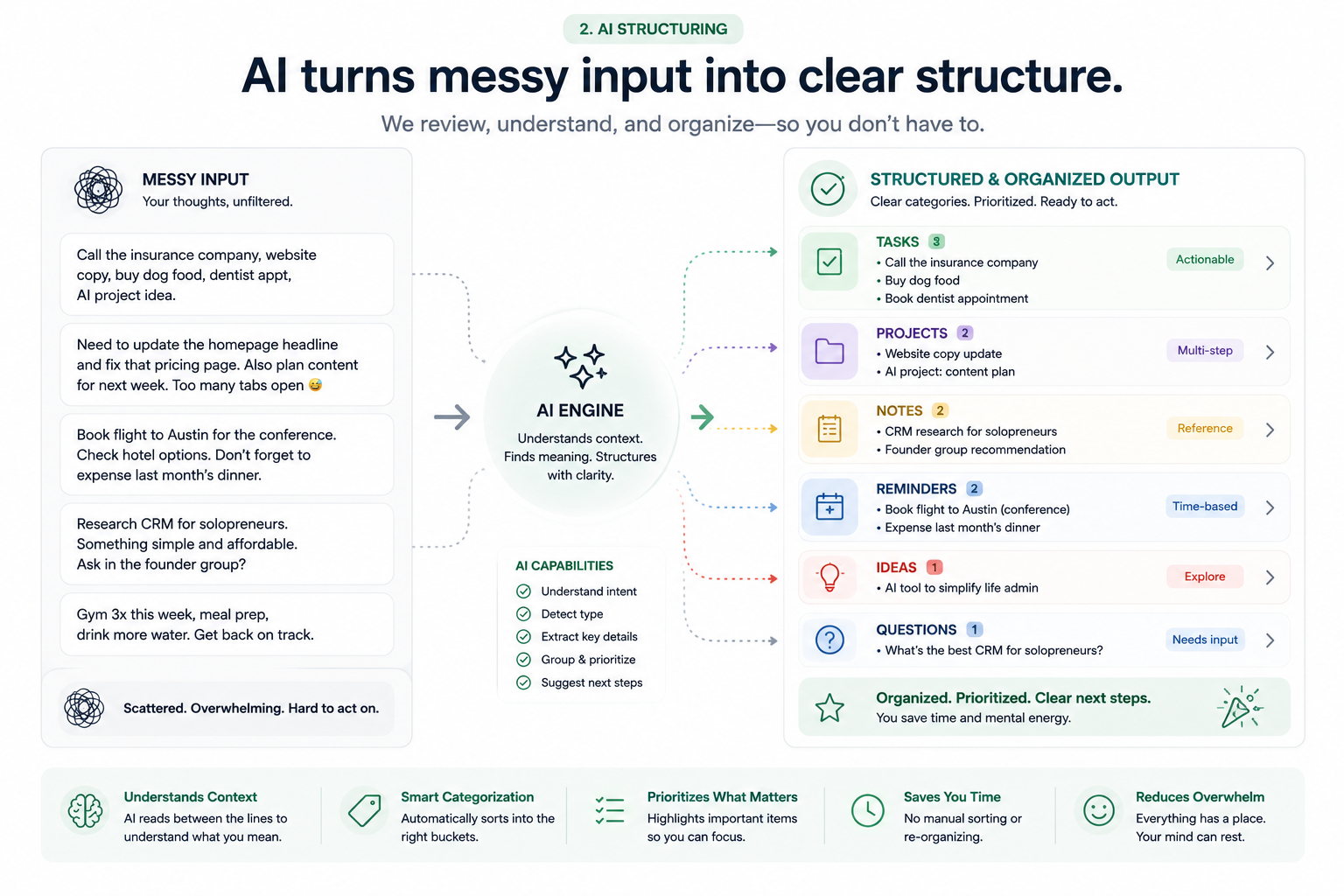
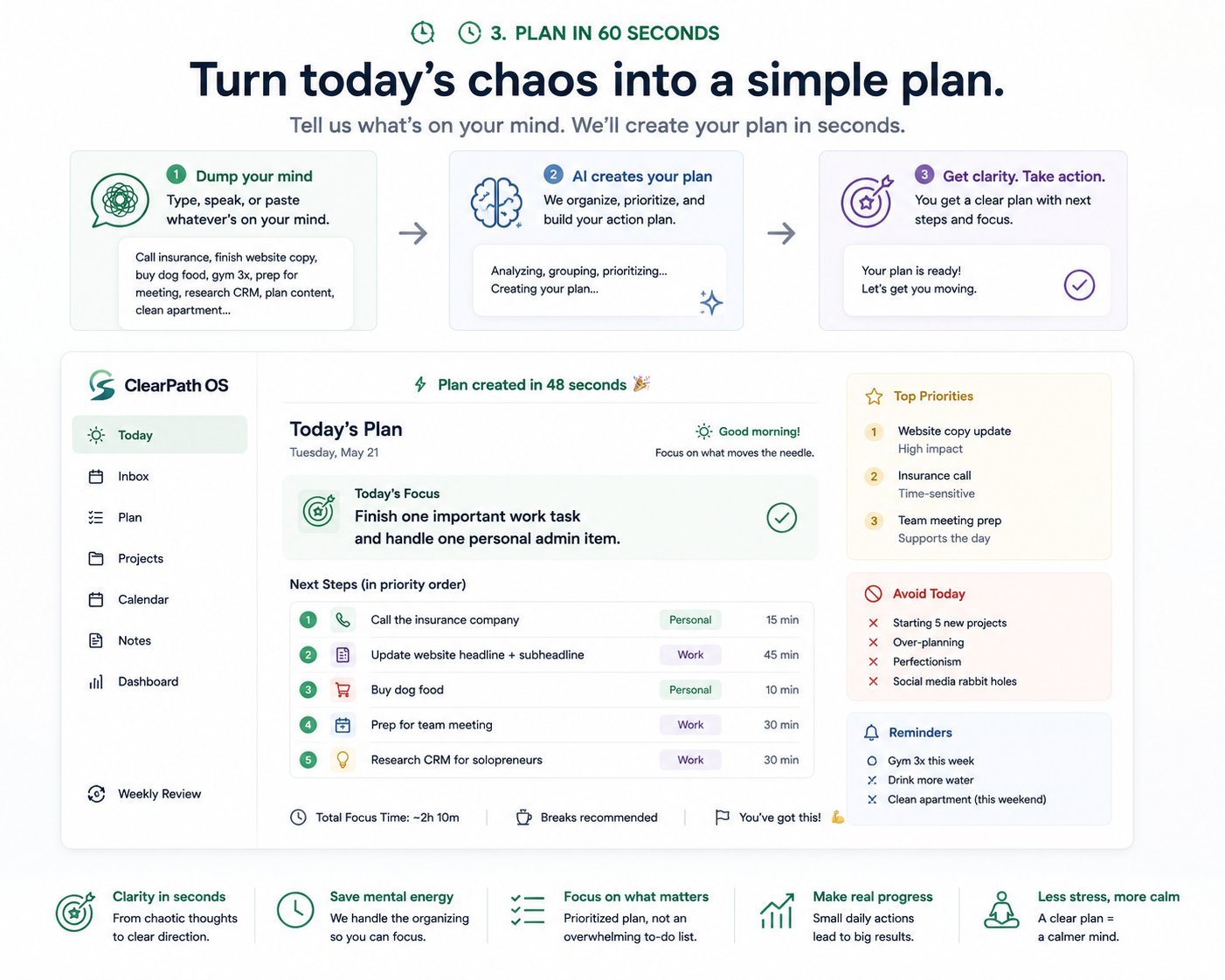
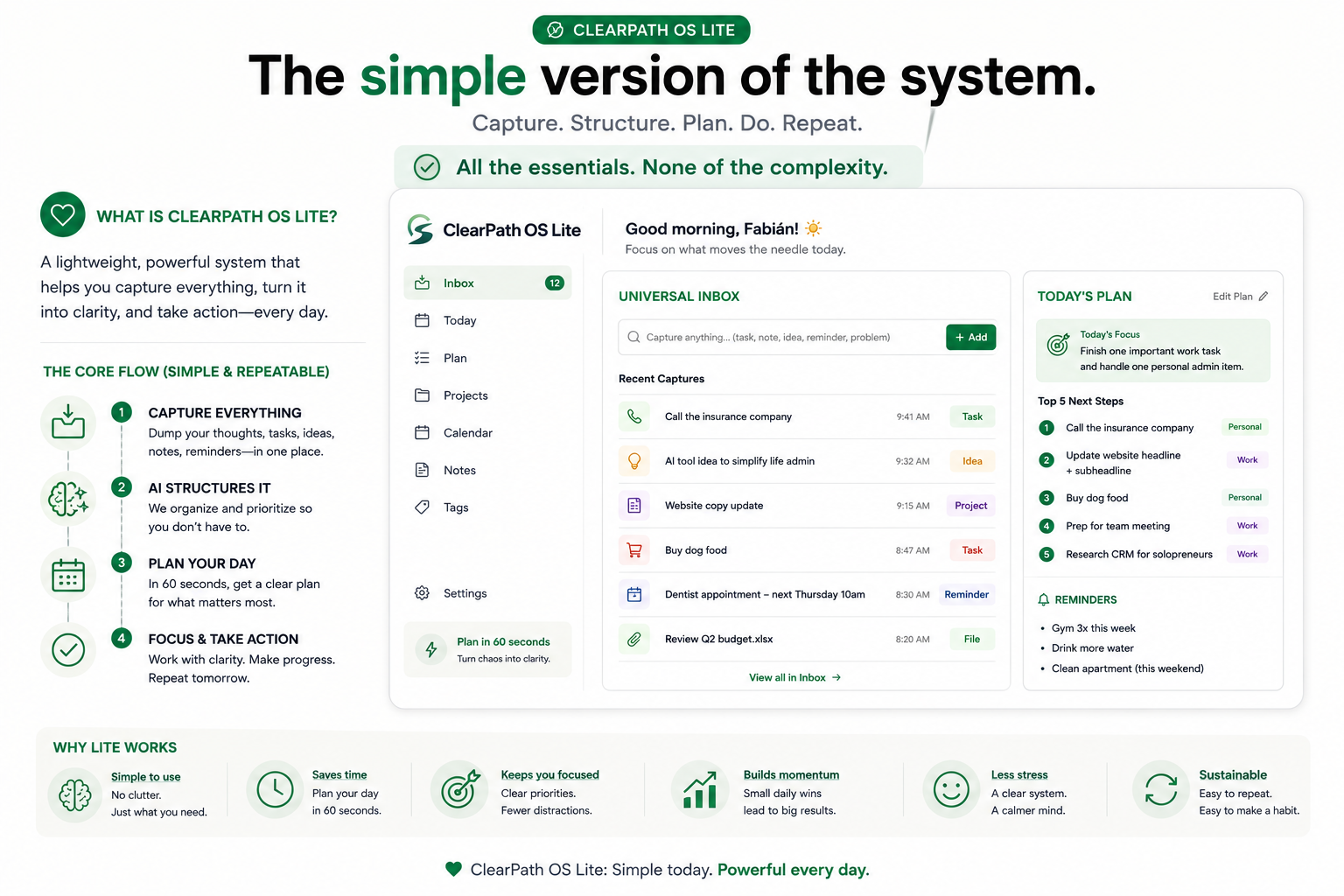
The uploaded ClearPath OS visuals are now treated as product artifacts: diagrams, workflow maps, interface architecture, and operating-system proof.
Case Context
A product concept for turning scattered life admin into emotional and operational calm.
They need a system that lowers cognitive load and turns messy inputs into decisions, plans, and next actions.
Case-study artifacts include screenshots, diagrams, process maps, before/after examples, and output models.
The Lite version focuses on capture, structure, review, and daily planning before adding deeper automation.
Workflow Diagram
Messy notes become useful action through one visible loop.
The workflow is intentionally simple. AI does the first structuring pass, then the human reviews and approves the final output.
01
Messy Notes
Insurance call, website copy, dog food, AI idea, dentist bill, too many tabs open.
02
AI Structuring
Classifies, groups, extracts urgency, identifies open loops, and suggests next steps.
03
Human Review
The user edits, confirms, rejects, or adds context before anything becomes official.
04
Final Output
Today's focus, priority order, reminders, project cards, and one realistic next action.
Executive Summary
Not another task manager. A calm planning layer for messy human reality.
ClearPath OS Lite explores how AI can help people move from mental clutter to usable structure without asking them to become productivity experts first. The product is designed around a universal inbox, AI-assisted sorting, and a short daily planning loop that turns overwhelm into one visible path forward.
01Capture everything in one low-friction inbox.
02Classify messy inputs into tasks, notes, projects, reminders, and decisions.
03Generate a short plan people can actually use today.
Differentiation
Different from productivity dashboards because it starts where people actually are.
Most productivity tools assume the user is ready to organize. ClearPath OS assumes the user is overloaded, interrupted, and carrying unfinished loops in their head.
The user creates the database, names the tags, maintains the system, and decides the plan.
The user dumps what is on their mind. The system proposes categories, priorities, and next steps.
Dashboards can become another place to check, clean, and feel behind.
The interface narrows attention to today's focus, open loops, and one calm next move.
The Human Problem
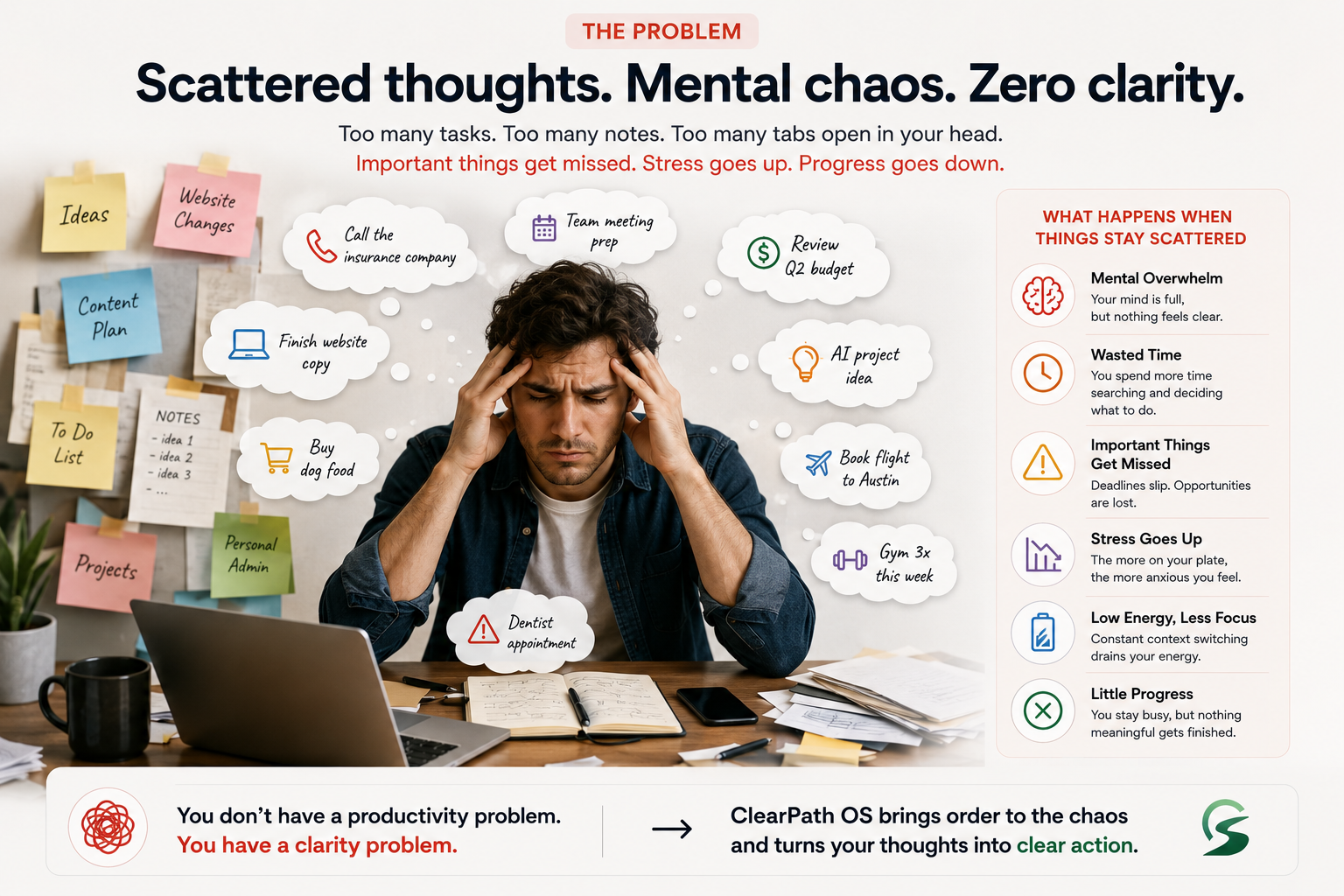
Most productivity systems break at the exact moment people need them most.
When life gets loud, people do not have energy to maintain a complex system. Tasks live in notes apps, messages, memory, calendars, browser tabs, and vague guilt. The operational problem is not laziness. It is unclear intake, unclear ownership, unclear priority, and too many open loops competing for attention.
Personal tasks, work obligations, ideas, and reminders arrive without a shared structure.
Everything feels important because nothing has been translated into sequence, effort, or consequence.
The user spends their best energy deciding what to do instead of doing the work.
Overbuilt tools create another thing to fail at, especially for neurodivergent users.
Why ClearPath
Operational complexity is not abstract to me. I have seen how systems feel from the front line.
My perspective comes from public-service systems, frontline communication, workflow pressure, process ambiguity, and the human frustration that appears when systems are technically present but practically unclear. ClearPath OS is built from that worldview: AI should reduce cognitive load, preserve human judgment, and make the next action easier to trust.
Public-service systemsDesigning for pressure, handoffs, exceptions, and imperfect information.
Frontline communicationUnderstanding how clarity changes behavior when people are busy or stressed.
Operational designTurning ambiguity into repeatable flows, visible ownership, and useful structure.
Ethical AIUsing automation to support agency, not to flatten human context.
Operational Reality
The product is designed for real-world friction, not idealized productivity.
ClearPath OS Lite borrows from environments where the system has to work while people are interrupted, overloaded, and operating with partial information. That means every feature must make ambiguity easier to handle: what came in, who owns it, what matters now, and what can wait.
Requests come from messages, memory, meetings, errands, and unfinished thoughts. The system treats capture as a pressure valve.
The AI layer separates action, context, decision, and reminder so the user does not have to decode everything twice.
ClearPath turns vague obligations into owner, priority, sequence, and follow-up prompts.
Recurring admin, weekly reviews, reminders, and project summaries become reusable operating loops.
System Architecture
The product is organized around one humane loop: capture, structure, decide, act.
The AI layer does not replace the person. It performs the exhausting first pass: separating signal from noise, identifying what kind of thing each input is, and proposing a small plan with visible reasoning.
Universal InboxMessy thoughts, tasks, reminders, ideas, life admin, work obligations
TaskActionable next step
ProjectMulti-step outcome
ReminderTime or context trigger
DecisionChoice that needs clarity
NoteReference or memory
IdeaPossible future direction
Plan in 60 SecondsToday's focus, next steps, avoid list, follow-up prompts
Design Decisions
The most important design choice was restraint.
ClearPath OS Lite avoids becoming a giant productivity dashboard. Every decision was filtered through a simple question: does this reduce cognitive load when the user is already overwhelmed?
Capture had to be faster than organizing. The system accepts rough input before asking for structure.
The AI suggests categories and priorities, but the user stays in control of approval and edits.
The primary output is not a database. It is a short, realistic plan for today.
Users should see why something became a task, reminder, decision, or project.
Iterations
The concept moved from broad second brain to focused daily clarity system.
The early direction could have become a large life dashboard. The stronger version narrowed the product around the moments where people most need support: capture, structure, and deciding what to do next.
Too broad. Useful, but at risk of becoming another system to maintain.
Clearer, but still too task-manager-like without enough human context.
The breakthrough loop: quick dump, AI structure, human review, daily action.
The focused MVP: universal inbox, AI structuring, daily plan, reminders, and review.
Blueprint Visual
A full system blueprint makes the implementation visible at a glance.
This visual translates the concept into a practical operating map: capture points, AI structuring, daily planning, reminders, project space, and knowledge storage all connected in one calm architecture.
Universal InboxText, voice, and quick-add inputs enter one shared system.
AI Structuring EngineClassifies, prioritizes, summarizes, and suggests next actions.
Daily Planning DashboardConverts the system into today's focus, top tasks, and a 60-second plan.
Visual Proof
The memorable moment: mental chaos becomes an operating picture.
This section is designed as the iconic visual for the case study: an operating-system style pipeline where messy human input is visibly transformed into categorized work, a daily command view, and a concrete output.
01 / Raw Input
insurance call
website copy
dog food
AI project idea
dentist bill
Sunday plans
02 / AI Structuring Engine
AI
classify
dedupe
sequence
ask
03 / Command View
FocusClose one admin loop.
NowCall insurance.
NextUpdate headline.
HoldAI idea becomes project.
Workflow
Actual use starts with a messy sentence, not a perfect system.
1. Dump
The user writes naturally, with no formatting tax.
"Need to call insurance, update site, dog food, maybe AI case study, dentist bill, ask mom about Sunday."
2. Sort
AI converts the messy input into clear object types.
- Task: Call insurance company
- Project: AI case study
- Reminder: Ask mom about Sunday
- Shopping: Dog food
3. Decide
The system names the practical order of operations.
Best next move: handle the insurance call before creative work because it carries external dependency.
4. Act
The user receives a small, calm execution plan.
- Call insurance.
- Update website headline.
- Add dog food to shopping list.
UI Examples
Interface patterns are designed for relief, not performance theater.
The UI stays direct: one place to capture, one place to review structure, one place to plan the day. Motion supports comprehension by showing messy input becoming grouped, sequenced, and actionable.
Prompt Architecture
The prompt system is designed like an operational intake protocol.
Instead of asking AI to simply summarize, ClearPath OS gives the model a job: identify object types, preserve uncertainty, ask useful questions, and produce an editable plan.
"Dump everything on your mind. Do not organize it first."
Task, project, reminder, note, idea, question, decision needed, waiting on.
Show why an item was categorized and what context is missing.
Today's focus, priority order, avoid list, reminders, and clarifying questions.
Process Maps
The system has two maps: what the user sees and what the AI does underneath.
The interface stays simple, while the underlying process separates intake, classification, prioritization, review, and output generation.
Product Screenshots
Four concrete screens show how the system would actually be used.
These are case-study interface mockups, built to make the implementation visible: capture, review, plan, and weekly reflection.
Audience
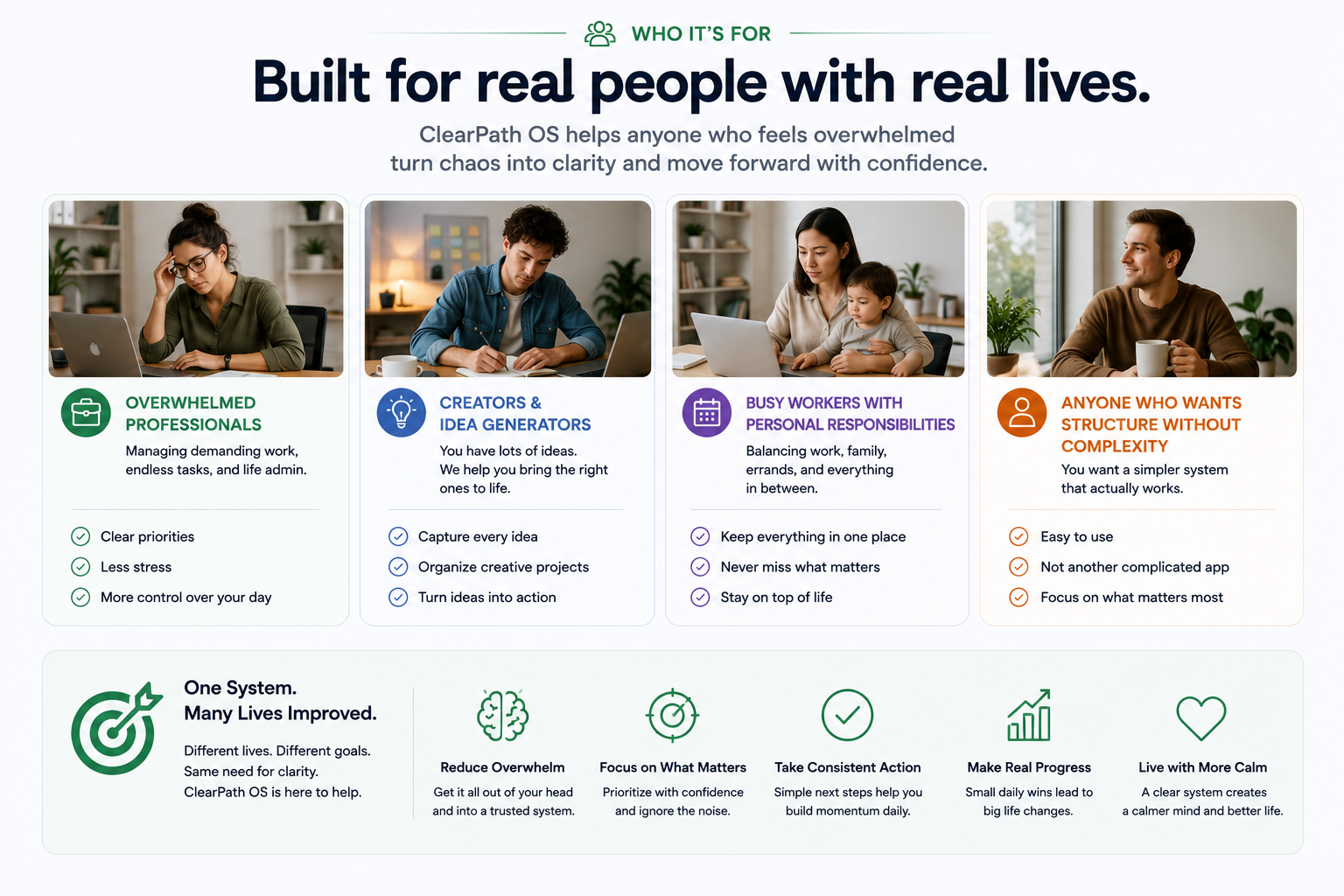
ClearPath OS is built for real people with real lives.
The audience visual turns positioning into something immediately readable: overwhelmed professionals, creators, busy workers with personal responsibilities, and people who want structure without complexity.
Before / After
The value is visible in the transformation from mental noise to operational clarity.
ClearPath OS Lite proves itself by producing structured outputs a person can inspect, edit, and act on immediately.
Before: raw mental load
Need to deal with insurance, website copy is still not done, dog food, maybe the AI project should become a case study, still need to pay dentist thing, forgot to answer that message, I should probably organize notes but I do not know where to start.
After: ClearPath output
Today's focus
Close one admin loop and make one visible business progress move.
Priority order
1. Call insurance. 2. Pay dentist bill. 3. Update website copy. 4. Save AI case study idea as a project.
Clarifying question
Is the AI case study meant to show product strategy, interface design, or workflow automation?
Real Outputs
An example draft shows the AI layer producing something useful, editable, and calm.
The output is intentionally not overconfident. It gives structure, names assumptions, and keeps the user in control of the final decision.
Example draft / generated plan
ClearPath Daily Brief
Read this first: Today is not a day for expanding the system. It is a day for closing loops.
Best order: Call the insurance company before creative work. It has the highest chance of creating a dependency or follow-up.
Creative task: After the admin item, update only the website headline and opening paragraph. Do not redesign the page today.
Question: Should the AI case study be positioned as a product concept, workflow design exercise, or operational AI example?
Structured object output
TypeTask
Call insurance company
PriorityHigh
External dependency, may affect future planning.
ContextLife admin
Requires phone call, account details, and possible follow-up note.
Next actionPrepare
Find policy number before calling.
Artifacts
Each artifact proves a different part of the operating system.
Input taxonomy
A practical classification system for task, project, note, idea, reminder, question, and decision-needed objects.
60-second plan prompt
A reusable AI prompt pattern that generates focus, next steps, avoidance guidance, and follow-up questions.
Daily operating view
A focused UI model that shows today's plan without turning the whole product into a dashboard maze.
Automation map
A future-ready model for reminders, recurring admin, project summaries, and weekly review routines.
Implementation Logic
Build the smallest useful system first, then let behavior teach the product.
Prototype 1Single inbox, manual review, simple category tags.
Prototype 2AI structuring pass with confidence, rationale, and editable outputs.
Prototype 3Daily plan generation, reminders, and recurring life admin routines.
Prototype 4Integrations for calendar, notes, email summaries, and lightweight automation.
Operational Proof
The concept works because it changes the shape of the work.
01
Human-first intakeThe user can write like a person instead of obeying a database.
02
Visible AI reasoningThe system shows why an item became a task, reminder, decision, or project.
03
Practical daily executionThe plan narrows the day instead of generating more options.
04
Automation-ready structureClean object types make reminders, summaries, and workflows easier to automate later.
Outcomes
The outcome is not more productivity. It is less ambiguity.
Clear systems do not make people more mechanical. They give people enough structure to be human under pressure.