Inconsistent onboarding
New team members learn by asking around, shadowing different people, and inheriting conflicting habits.
A practical tool that turns messy team knowledge into a clear SOP, process map, and checklist—while keeping final decisions with people.
One example shows the full transformation: rough call-handling notes become clear steps, decision points, handoffs, and a review-ready SOP.
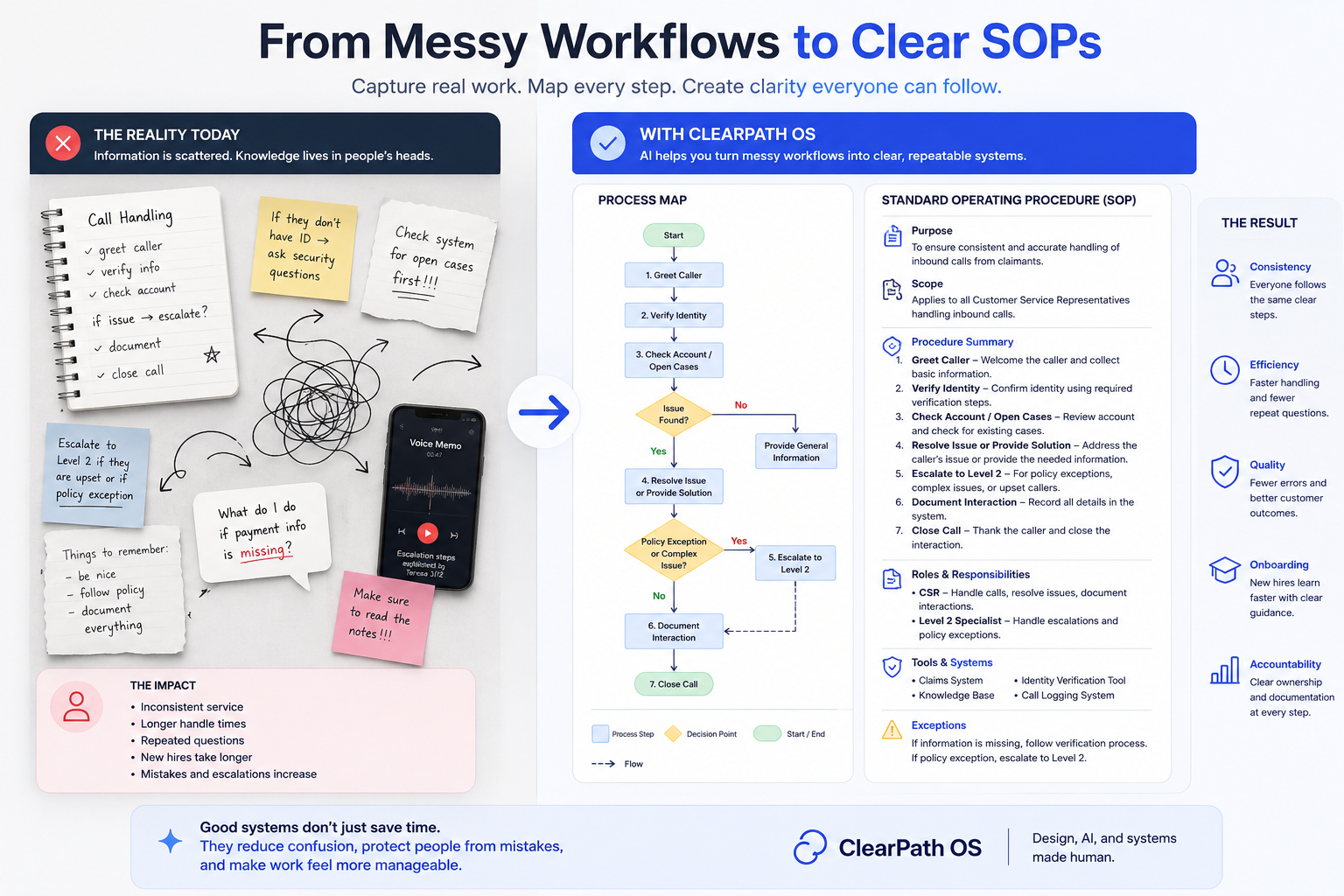
The pain is not abstract. It shows up as repeated mistakes, inconsistent onboarding, unclear ownership, and workers having to ask the same questions because the process lives in people instead of the system.
New team members learn by asking around, shadowing different people, and inheriting conflicting habits.
Missing information, skipped documentation, and unclear escalation points create rework and avoidable frustration.
The most useful process knowledge lives in memory, chats, quick explanations, and the person who has been there longest.
Workers are not always sure who reviews, who decides, who documents, or when the issue should move to a supervisor.
In public-service and frontline environments, the work is rarely clean. People are interpreting policy, calming frustration, searching for missing information, documenting decisions, and deciding when to escalate. When the process lives only in memory, every shift becomes a small reinvention of the same system.
The SOP Generator is framed around a frontline service scenario: call handling, missing information, eligibility review, escalation rules, and final documentation. The case study shows how a person can move from rough notes to a reviewed procedure without needing to be a process designer first.
Customer service representatives, supervisors, trainers, reviewers, and operations leads who need consistent execution.
People handle incomplete information, emotional conversations, system gaps, and unclear escalation paths.
The output must become something a team can train from, audit, revise, and follow under pressure.
AI structures the work, but people approve the policy, tone, privacy, and judgment-sensitive decisions.
The core design question was not “How fast can AI write an SOP?” It was “How can AI make hidden process knowledge visible while preserving accountability?”
The system accepts notes, screenshots, voice summaries, and incomplete explanations because real operations rarely begin as clean forms.
Routine actions can be structured quickly, while policy interpretation, risk, and escalation stay marked for human review.
Teams need more than a document. They need an SOP, process map, checklist, escalation logic, and training summary.
Missing information, unclear ownership, and conflicting guidance are flagged instead of smoothed over by polished AI language.
The experience includes approve, revise, export, and version thinking so teams can improve the process over time.
The interface keeps structure clear and restrained because users are already dealing with pressure and complexity.
This case study is built from a specific perspective: real operational complexity, public-service systems, frontline communication, workflow pressure, process ambiguity, and the frustration people feel when systems make simple things hard.
The hidden work is not just writing instructions. It is translating frontline communication, repeated questions, policy ambiguity, emotional pressure, missing information, supervisor handoffs, and system friction into something a team can actually use on a busy day.
People need steps that match the actual call, case, form, system, and handoff sequence, not a generic policy summary.
The same explanation often appears in calls, notes, chats, emails, and training. The tool turns repetition into reusable operating language.
When rules are unclear, the system does not pretend certainty. It flags where judgment, review, or supervisor input is required.
Missing documents, frustrated callers, duplicate records, unclear ownership, and system delays are treated as part of the workflow.
This is the memorable product moment: an AI-supported documentation pipeline where every transformation is visible, reviewable, and connected to a practical output.
Raw explanations from the people who know the work.
The system identifies actors, triggers, required information, and systems of record.
Ambiguous moments become visible decisions, not hidden assumptions.
Supervisors check policy, privacy, tone, escalation, and accuracy.
The output becomes a usable SOP, process map, checklist, or training guide.
Plain-language procedure with scope, owner, prerequisites, and final note language.
Visual sequence of triggers, actions, decisions, handoffs, and final states.
Clear stop points for policy risk, caller distress, system conflict, or supervisor discretion.
A shortened version new employees can use to learn the work without memorizing chaos.
The product flow is designed so a non-technical operations worker can understand where AI helps, where human judgment enters, and what the final output should be.
Call notes, voice explanations, screenshots, policy fragments, repeated questions, and informal team knowledge.
Extract steps, roles, decisions, missing information, required systems, escalation points, and documentation needs.
Validate policy, accuracy, privacy, tone, assumptions, supervisor thresholds, and edge-case handling.
Publish an SOP, workflow map, checklist, training summary, decision log, and escalation guide.
The AI is guided to ask for missing context, separate facts from assumptions, and return structured outputs that can be reviewed by a person responsible for the process.
Collect the rough explanation and identify the process trigger, user goal, roles, required information, tools, and known exceptions.
Convert the raw material into steps, branches, escalation logic, documentation fields, and quality checks.
Prepare the human review layer by surfacing policy risk, privacy concerns, ambiguous language, and supervisor-only decisions.
The product is not trying to make people sound more formal. It is trying to make the work easier to understand, repeat, teach, audit, and improve.
Confirm identity and case number before discussing details.
Look for pending action, missing documents, or prior notes.
If no, identify exact missing item and next step.
Explain what is needed, where to send it, and expected follow-up.
Route to supervisor when case complexity or caller distress exceeds script.
Record reason, guidance given, missing items, and escalation status.
The tool guides a worker, supervisor, or operations lead through the questions that matter when documenting real work.
AI does the organizing work: extracting structure, drafting language, surfacing decisions, and asking for review where confidence should not be assumed.
The case study uses mock operational artifacts to make the product feel buildable: a structured SOP template, a decision tree, and a handoff map that reflect how work actually moves through a team.
A structured procedure that defines scope, required information, role ownership, documentation language, and exceptions.
A clear branch model that keeps routine guidance separate from policy, risk, or supervisor-only judgment.
A role map that clarifies where intake, review, processing, decision-making, documentation, and communication live.
Each artifact below is an example of what the system produces. Together, they demonstrate the full path from rough knowledge to usable operating infrastructure.
Purpose, scope, required information, roles, procedure steps, exceptions, escalation language, and documentation standards.
A visual flow that shows what happens first, where decisions occur, and how work moves across roles and systems.
A short checklist that helps workers confirm identity, required documents, notes, escalation status, and final outcome.
The visual outputs make the implementation tangible: an example draft, before/after translation, workflow map, interface mockup, review state, and architecture view.
This walkthrough shows the SOP workflow as a practical product experience: messy operational input becomes clearer structure, reviewable logic, and a usable output that still keeps human judgment in control.
The draft includes purpose, scope, required information, step sequence, exception handling, and final documentation language.
The map makes handoffs and decision points visible, which helps teams train, audit, and improve the workflow.
The system marks uncertainty instead of hiding it, so teams know where human judgment is needed before rollout.
The interface focuses on structured input, visible confidence, editable outputs, and practical export paths.
The tool is designed as a workflow system, not a one-shot generator. Inputs, extraction, artifact generation, review, publishing, and feedback all remain visible.
This structure protects teams from treating generated text as automatic truth. Every output can carry assumptions, reviewer notes, version history, and approval status.
The product experience favors guided questions, visible assumptions, and clear review states over a blank prompt box. AI becomes a structured assistant, not a mysterious black box.
Caller needs help understanding a pending case action.
Case number, identity verification, current status, missing documents, prior notes.
Caller cannot access portal, document already submitted, policy question requires supervisor.
Confirm escalation threshold before publishing this SOP.
6 steps, 2 decision points, 3 required data fields, 2 escalation triggers.
Escalation language differs across teams. Supervisor approval required.
When a caller requests a case update, first verify identity and locate the active case. If documentation is missing, explain the exact item needed and record the guidance provided.
The value is in the specifics: what to ask, what to check, when to stop, when to escalate, and what language belongs in the final record.
Each iteration moved the project away from “AI writes a document” and toward “AI helps a team understand, review, teach, and improve a workflow.”
The earliest version focused on turning notes into a clean SOP. Useful, but too static for real operational ambiguity.
The next version added workflow mapping so teams could see decisions, exceptions, handoffs, and final states.
The system began flagging assumptions, missing information, privacy issues, and supervisor review points.
The final direction includes SOP, map, checklist, escalation guide, decision log, and onboarding summary.
The work was never messy because people were careless. It was messy because the system was invisible.
Edit the source notes, then generate a realistic SOP, process map, and quick-reference checklist. This front-end prototype demonstrates the intended review experience; it does not send or store your text.
Purpose: Give callers consistent, accurate next-step guidance while keeping policy decisions with an authorized reviewer.
Start with one real workflow, structure what is known, create the working materials, and hand control back to the team.
Collect notes, examples, roles, exceptions, and the moments where people get stuck.
Turn the real workflow into visible steps, decisions, handoffs, and gaps.
Create the SOP, process map, checklist, and improvement recommendations.
Review the system with the team so they can use it and keep it current.
Bring one messy, high-friction workflow. Leave with a practical operating system your team can understand, review, and use.
Best for a recurring workflow with unclear steps, repeated questions, inconsistent handoffs, or knowledge trapped in one person’s head.
Start a workflow conversationA focused review of the current process, source material, roles, bottlenecks, and decision points.
A clear visual of triggers, actions, decisions, exceptions, handoffs, and final states.
A plain-language SOP with purpose, scope, owners, steps, exceptions, and quality checks.
Prioritized opportunities to reduce friction, clarify ownership, and strengthen the workflow.
A guided walkthrough so your team can use, maintain, and improve the finished system.
The system is designed to support judgment, not replace it. Ambiguity is surfaced. Assumptions are labeled. Sensitive details are handled carefully. Final approval stays with people.
AI-generated steps are marked as drafts until reviewed by a responsible person.
The tool highlights gaps, conflicting instructions, and areas where source material is incomplete.
Inputs are structured to minimize sensitive data and remind users when details should be generalized.
The system identifies when a case should move from script, checklist, or SOP into human supervisor judgment.
The output is not just a prettier document. It is reduced repeat questions, clearer training, more consistent service, faster review, and fewer moments where a worker has to guess what the system expects from them.
A good system does not make people feel processed. It makes the next right action easier to see.